Can I turn Portuguese-accented English into a US accent for a presentation?
Accent Changer Team

Yes — you can turn Portuguese-accented English into a US accent for a presentation without re-recording the whole deck. Record your slides once, then run the voice-over through speech-to-speech accent conversion: upload the audio, choose American English, and download a US-friendly version that keeps your pacing and delivery.
Presentations are unforgiving. Investors, conference audiences, and remote teams often judge clarity in the first thirty seconds. If you speak excellent English with a Brazilian or European Portuguese influence, a Portuguese accent to American accent converter lets you polish the file after the fact — same script, same energy, American pronunciation.
Why presentation audio is a good fit
Slide voice-overs are usually short, structured, and recorded in one session. That makes them ideal for accent conversion:
- You already locked the timing to animations and transitions
- Re-recording means syncing every slide again
- A single pass on the audio track is faster than a second booth session
- You can A/B test a US version before the live event
The goal is not to hide where you are from — it is to make technical content effortless for a US audience to follow. The same post-production pattern works for course voiceovers localized to British English — one recording, accent-adjusted exports.
What changes vs what stays
Portuguese-influenced English often shows up in vowel quality, epenthetic vowels before consonant clusters, /r/ coloring, and stress patterns. American listeners may notice those more than the substance of your talk.
A good converter preserves:
- Your vocal identity — pitch and timbre
- Slide timing — length should stay close enough to re-sync if needed
- Emphasis — the points you stressed on key bullets
- Language — same English words and terminology
What shifts is pronunciation toward General American norms.
How to do it for your presentation
accentchanger.com works in the browser: upload or record, select American English, preview, and export MP3.
Step 1: Export or record clean speech audio
Pull the narration track from your video editor, or upload the presentation video — the tool can process the speech track. Minimize room echo and background hum.
Step 2: Target American English
Pick the US accent profile and preview a short section first. Listen for clarity on technical terms and proper nouns your audience will repeat.
Step 3: Replace the track and re-export
Drop the converted audio back into PowerPoint, Keynote, or your video editor. Check that slide transitions still line up; minor length changes are usually small.
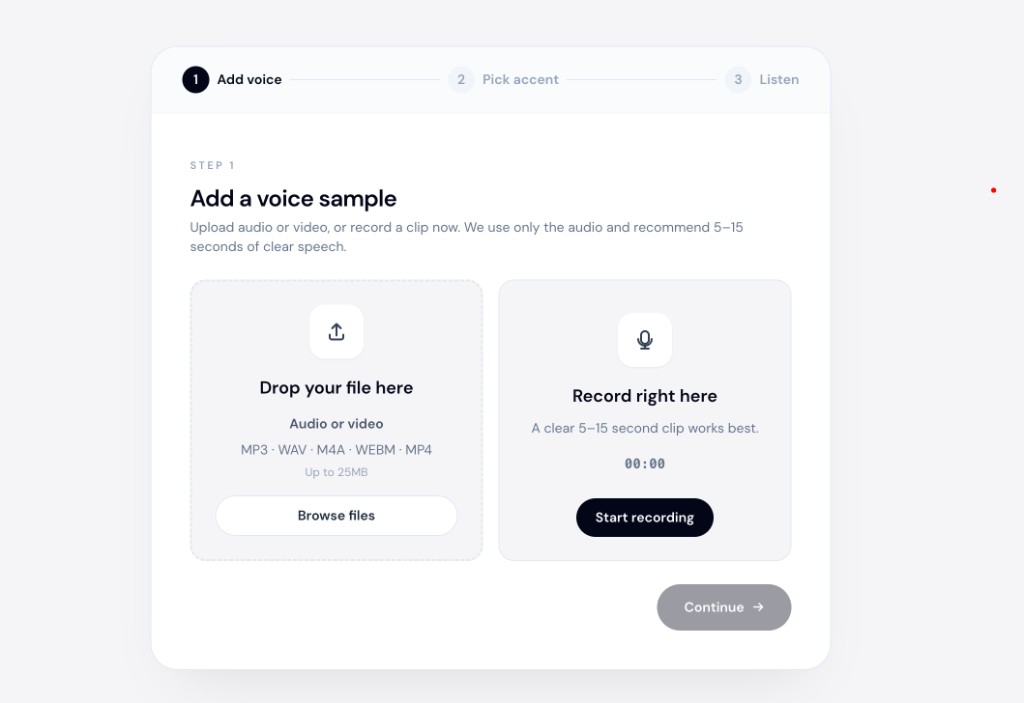
See the Portuguese to American accent converter page for workflow details aimed at Lusophone English speakers.
Tips for better results
- Record presentation audio without music underneath — convert speech first, add music after.
- Break long decks into chapters if you want to preview quality section by section.
- Keep a backup of the original track in case you need to re-cut timing.
What to avoid
- Text-to-speech for a talk you already gave — you will lose your authentic delivery. Many voice accent changer listings are TTS, not speech-to-speech.
- Noisy hotel-room recordings — conference prep often means bad acoustics; a quiet re-take of problem slides may still be needed.
- Expecting live presentation mode conversion — this is file-based post-production, not a real-time stage filter.
Live routing on stage or mobile is a different product category. See real-time accent AI on mobile calls for why that rarely applies to presentation prep.
Bottom line
You can turn Portuguese-accented English into a US accent for a presentation by converting your existing narration to American English. Upload the voice-over, preview the result, and swap the audio track before you share the deck.
Start at accentchanger.com with one slide's audio as a test. For the voice-identity angle, read AI accent changer that keeps your voice before you batch-convert a full deck.