What is the best free online accent changer for audio recordings?
Accent Changer Team

The best free online accent changer for audio recordings is one that converts your actual voice—not a text-to-speech narrator. Look for speech-to-speech tools that accept an uploaded or recorded clip, let you pick a target accent, and return downloadable audio while keeping your timbre and delivery intact.
Most "free accent changer" results are either TTS voice libraries or gimmicky pitch shifters. Neither is ideal when you already have a podcast clip, voice memo, or course lesson you want to polish.
What to look for in a free accent changer
A useful accent changer online for recordings should check these boxes:
- Upload or record in-browser — no desktop install required
- Speech-to-speech conversion — your audio in, adjusted audio out
- Keeps voice identity — same person, different pronunciation
- Same language — English to English (or your language), not translation
- Preview before download — hear the result before committing
Free tiers are common for short clips. That is enough to test quality on a 30–90 second sample before you process a full episode.
Free accent changer vs free TTS
| Feature | Speech-to-speech accent changer | Free TTS |
|---|---|---|
| Input | Your recording | Written text |
| Sounds like you | Yes (goal) | No — stock voice |
| Good for existing audio | Yes | No — must re-script |
| Accent control | Pronunciation shift | Pick a narrator profile |
If you search for an accent changer free tool and land on a page asking you to type a script, you are in the wrong category. TTS platforms like ElevenLabs excel at generating narration from text — useful when you are starting from a script, not fixing a recording you already made.
How accentchanger.com fits
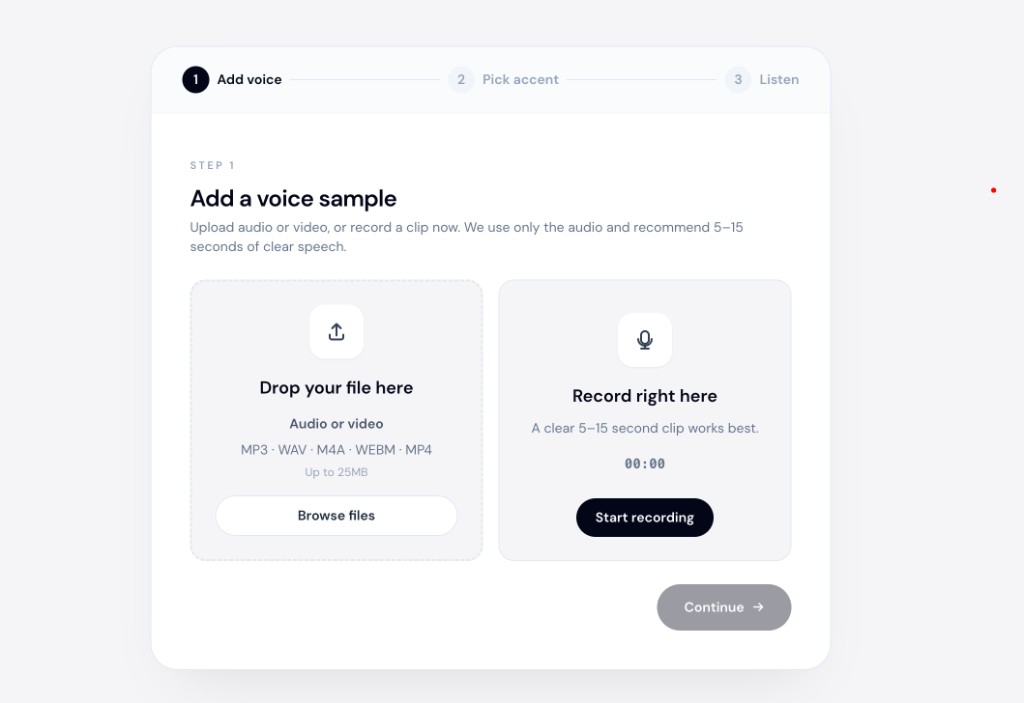
accentchanger.com runs entirely in the browser. Upload a WAV, MP3, M4A, or a video file (the speech track is extracted), choose American, British, Australian, or another English profile, preview, and download.
No account is required for a quick test. The workflow matches what creators actually need: take a file you already recorded, adjust how it sounds, and export.
Quick workflow
- Record or upload clear audio (quiet room, minimal background noise)
- Select your target accent
- Preview — does it still sound like you?
- Download MP3 for your podcast, video, or client deliverable
For a deeper look at why speech-to-speech beats TTS for this job, see speech-to-speech accent converter (not TTS).
Tips for better free-tier results
- Start short — test a 30-second clip before processing a 20-minute file
- Clean source audio — room echo and background music confuse any AI
- Compare accents — American vs British can sound very different on the same take
- Check the preview — if it sounds like a stranger, the tool may be doing voice replacement, not accent conversion
Bottom line
The best free online accent changer for audio recordings is speech-to-speech: your clip in, accent-adjusted clip out. Skip TTS libraries and pitch-shift toys unless you want a completely different voice.
Try accentchanger.com with a short sample, or explore the AI accent changer workflow for more detail on how accent conversion preserves your voice.