How can I convert a Chinese accent to American English on audio?
Accent Changer Team

Yes — you can convert a Chinese-accented English recording to American English without re-recording. The practical approach is speech-to-speech accent conversion: upload your audio, choose an American English target, and the AI adjusts vowel placement, consonant clarity, and intonation while trying to preserve your timbre and pacing.
That is different from text-to-speech or a generic voice filter. If you already have a take you like — a podcast clip, course lesson, or client demo — you want a tool that works on your file, not a stock narrator. For Mandarin or Cantonese-influenced English, a dedicated Chinese accent to American accent workflow targets the specific pronunciation patterns that US listeners notice most.
What actually changes on the audio
Mandarin-influenced English often carries recognizable traits in American ears: flatter or shifted vowels (especially in words like "think" or "beach"), /r/ and /l/ distinctions, syllable stress, and rising intonation at phrase endings. A good converter nudges those toward General American patterns without rewriting your script.
What should stay the same:
- Your voice identity — pitch range and vocal color
- Your words and meaning — same English, different delivery
- Timing and emotion — pauses, emphasis, and energy from the original take
If the output sounds like a completely different person, you are probably in a TTS library, not accent conversion. A proper AI accent changer that keeps your voice should still sound like you after conversion.
When this is worth doing
Creators and professionals who grew up speaking Chinese and English often record once, then adapt for a US audience:
- Explainer videos or YouTube content aimed at American viewers
- Sales demos, pitch decks with voice-over, or Upwork portfolio samples
- E-learning modules where clarity matters more than accent pride
- Podcast intros where you want neutral American delivery without a second session in the booth
Post-production conversion is faster than re-recording — especially when the script, pacing, and performance are already right.
How to convert Chinese-accented English to American audio
accentchanger.com is built for this: upload or record in the browser, pick American English, preview, and download MP3. No install required.
Step 1: Start with clean source audio
Record in a quiet room with minimal echo. Thirty to ninety seconds is enough to judge quality. The tool accepts common audio and video formats; for video files, the speech track is what gets converted.
Step 2: Select American English as the target
You are not translating — you are reshaping pronunciation on the same English script. Compare a short before-and-after to check naturalness.
Step 3: Preview, adjust, and download
Listen for whether you still sound like yourself. If consonants feel mushy, try a cleaner source file or a shorter clip first.
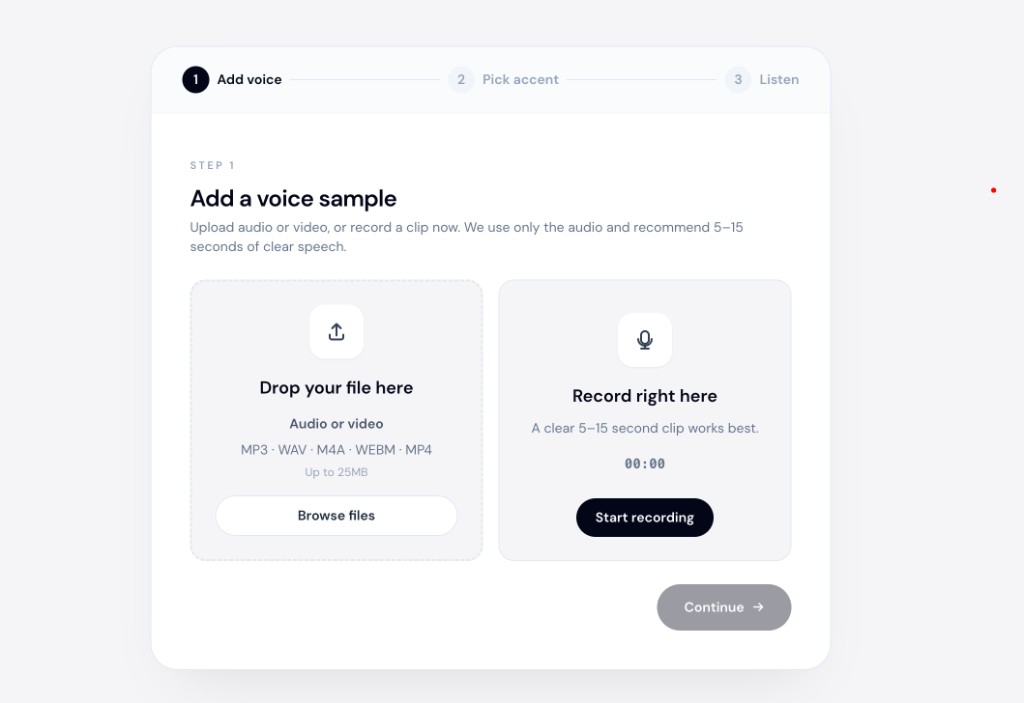
The online accent changer workflow is the same for audio-only and video uploads.
What to avoid
- Expecting perfect live-call conversion — browser tools work on files, not real-time Zoom audio.
- Using TTS when you already recorded — you will lose your performance; convert the recording instead.
- Noisy source audio — background music and room reverb make any AI struggle with /r/, /l/, and final consonants.
Bottom line
To convert Chinese-accented English to American English on audio, use speech-to-speech accent conversion on your existing recording. Upload a clear clip, target American English, and check that the result still feels like you.
Open accentchanger.com, try a short sample, and compare before and after.